


Most brands that say “we tried Canvas UGC and it didn’t work” never actually gave it a fair test.
A growth team might have hired a few creators and produced a batch of videos to publish, then a few weeks later, they were disappointed with the results. Views were inconsistent, installs didn’t noticeably move, and no one felt confident to invest more in this channel.
So the easy conclusion there is that “Canvas UGC doesn’t work for our app”. And maybe that’s the right conclusion for you, but what did you actually test?
If you ran one creative angle across a handful of posts, then you’ve learned something about that specific angle. But you haven’t necessarily learned whether different creators, formats, or hooks could perform better.
For a test to really be useful, it needs a much better plan than that.
With Canvas UGC, creators regularly publish short-form content through purpose-built accounts that are dedicated to your product, and that relies on organic distribution rather than an existing audience.
This guide goes through how to plan a Canvas UGC pilot, test different creative approaches, and interpret the results, before deciding whether the channel deserves more investment.
For a broader introduction to UGC and creator marketing, start with our Complete Guide to UGC Marketing for Apps.
What Should a Canvas UGC Pilot Prove?
A Canvas UGC pilot is a defined testing period designed to give you clarity about your product's potential with an organic creator-led channel before you commit to a larger program.
There are several things you may want to learn when starting a Canvas UGC pilot:
- Audience response: Do people care about the problem or benefit your content presents?
- Creative direction: Which creators, messages, and formats communicate your product best?
- Organic distribution: Can your content consistently reach relevant viewers through dedicated accounts?
- Product interest: Does that attention generate meaningful actions, such as profile visits, app-store impressions, downloads, or sign-ups?
- Commercial potential: Are the results promising enough to justify the cost of another testing cycle?
Each question becomes more demanding as you move down the list.
A video getting 50,000 views might tell you that its hook and subject appealed to viewers. But it doesn’t tell you how many of those viewers were potential customers.
A few videos that drive product-specific questions in the comments might suggest that you’re reaching the right people, but does the volume of this interest justify Canvas UGC as a viable acquisition channel?
You should also distinguish Canvas UGC testing from running commissioned UGC videos as paid ads.
With paid creative testing, platforms like TikTok’s Ads Manager offer a set of testing tools and greater control over how your experiments are set up. Canvas UGC relies on the organic recommendation algorithms used by platforms like TikTok and Instagram, where different videos may reach different audiences under different conditions.
That makes it very important to analyze patterns across content and creators, while limiting how confidently you can compare any two posts.
Ultimately, your pilot should give you enough evidence to make an informed next decision, even if that decision is to stop.
Before You Start: Is Your App Ready to Test?
You don't need a massive marketing team or an existing paid acquisition operation to test Canvas UGC. You don’t even need a finished or publicly launched app either.
Some brands have successfully run high performing Canvas UGC campaigns even before they launched to build hype and awareness, grow a waitlist, or even to get beta testers.
What ultimately matters is whether you have something meaningful to promote, and a clear idea of what you want the campaign to achieve.
Before committing a budget to Canvas UGC, check that you have:
- A clear product proposition: Whether your app is live, in beta, or still preparing to launch, your creators need to understand what it does, and why someone should care.
- A plausible target audience: You need a reasonable idea of who you’re trying to reach and whether they’re active on your chosen platforms.
- A set of initial creative angles: Can creators communicate the problem, use cases, or expected benefit without making claims that your product can’t yet support?
- A relevant next step: It could be an app-store download, a webapp link, a waitlist, an early-access signup or TestFlight link, or even just a defined awareness objective.
- A measurement plan: Your metrics should reflect your product's stage. A pre-launch campaign might track waitlist registrations, beta interest, or audience response, while a launched app could measure installs and downstream conversions.
- The resources to run the test: Is there enough budget for your intended scope? Is there someone responsible for approvals and decisions, and is there a process in place for managing creators and reviewing their performance?
The biggest distinction is what you’re trying to prove.
If you're preparing to launch, Canvas UGC can help you explore which messages resonate and whether you can generate interest before your product reaches the wider market.
If your app is already live, you can start evaluating how that attention translates into actual product usage and acquisition.
And if you've already built an established acquisition operation, you may be able to evaluate the channel against your commercial objectives.
There are, of course, valid reasons to postpone a pilot. For instance, if you can't yet communicate what the product does, don't have a useful destination for interested viewers, or can't fund a meaningful test, you may have more important priorities.
But being pre-launch, by itself, shouldn't disqualify an app from testing Canvas UGC.
For a broader assessment of suitability, see Will Canvas UGC Work for My App?
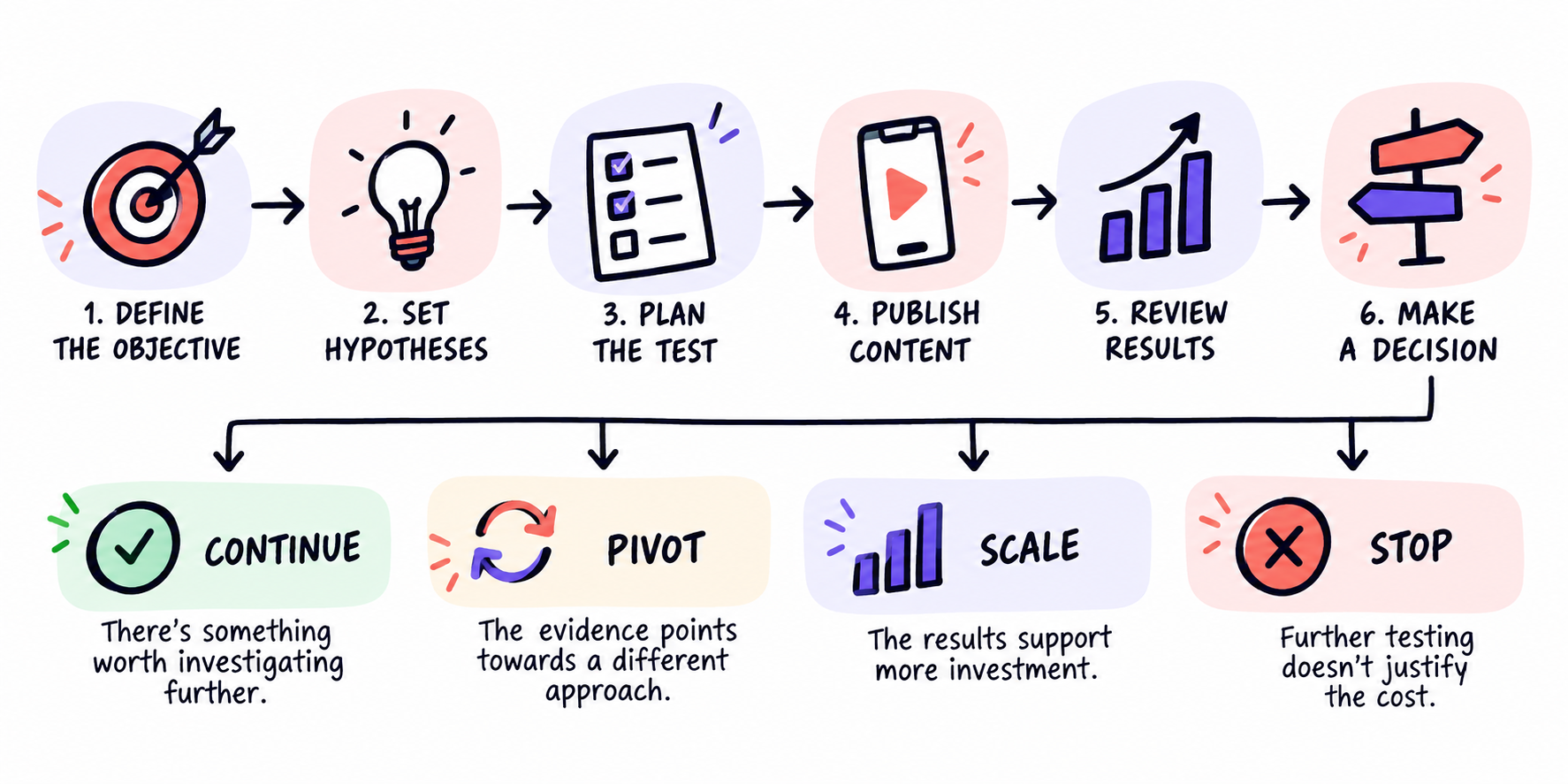
Step 1: Define the Objective and Success Criteria
Start with the business questions that made you consider Canvas UGC in the first place.
- Are you trying to learn how to position a new app?
- Do you want to find a repeatable source of organic installs?
- Are you looking to develop better creative for your existing paid campaigns?
All three objectives are valid, but they need different tests and should have different definitions of success.
For an early-stage study app, the question might be:
- Can creator-led demo videos generate enough interest among students struggling with exam prep?
For an already established productivit app, it might be:
- Can a Canvas UGC campaign help us reach relevant users and contribute enough acquisition and creative value to justify an ongoing program?
Pick one primary objective, and track supporting metrics where useful, but do not let them distract you from the reason you’re investing.
For example, if acquisition is your main goal, then views and watch time can help you understand distribution, but they aren’t substitutes for downloads or qualified users.
Before publishing anything, make sure to agree on the following points:
- Primary objective: What business question should this pilot answer?
- Supporting data: Which metrics or observations will help explain the result?
- Baseline: What relevant performance data do you already have?
- Budget ceiling: What's the maximum you're prepared to spend?
- Review points: When will you evaluate progress and make decisions?
- Continuation criteria: What evidence would justify another cycle?
- Stop conditions: What results or circumstances would make further investment unreasonable?
You probably won’t have reliable benchmarks for every single metric, and that’s fine. What does matter is being clear about what you can measure, and what remains uncertain.
If you have established acquisition data, then use that to set meaningful expectations. If you don’t, then focus on the learning objectives without pretending that views alone prove that a program is commercially viable.
Step 2: Turn Assumptions into Testable Hypotheses
"Let's see if TikTok works for our app" sounds like a testing plan, but it gives your team zero direction.
What conclusions would you draw if some videos got views and others didn't?
Your hypotheses need to be much more specific to be useful.
For example, let’s suppose you run a productivity app for students and young professionals.
You believe that people will respond more strongly to content about missing deadlines than content providing general productivity advice.
So you could write a hypothesis like this:
Content showcasing how our app helps people avoid missed deadlines will generate more product-specific interest among students and young professionals than general productivity tips.
Now you have something to investigate.
You now know:
- The intended audience
- The messaging difference
- The response you’re looking for
- The kind of evidence that may challenge your assumption
Other hypotheses could revolve around:
- Whether students respond more strongly to exam-related use cases than general time management
- Whether showing the app at the start of the video generates more interest than at the end
- Whether talking head content and story-based videos hold attention better than reaction videos
Start with meaningful differences in the messaging and presentation. Because there’s little value in spending your entire pilot changing the first sentence of a video if you haven't established which product benefit people care about.
And avoid changing everything at once.
If one creator films a comedy skit about deadlines while another makes a serious tutorial about managing expenses, their results won't tell you much about which hook, format, or message made the difference.
Try to compare similar concepts under similar comparable conditions.
Organic distribution will still introduce variation. TikTok considers factors such as viewer interactions and information about individual videos when recommending content, so two executions won't necessarily reach equivalent audiences.
That's why you should look for patterns across several comparable posts and creators rather than declaring a winning strategy because one video happened to take off.
Step 3: Choose Creators, Set up Accounts, and Define Your Test Scope
Once you've decided what to test, you need creators who can realistically communicate those ideas.
With Canvas UGC, follower count shouldn’t be a consideration at all. You're working with purpose-built accounts that start from zero. What matters is whether the creators can produce content that your target viewers can relate to, and would want to watch.
Look for creators who:
- Understand or relate to the problem your app solves
- Can demonstrate your product accurately
- Are comfortable creating content in the formats you want to test
- Understand how short-form storytelling works
- Can reliably produce and revise content
- Meet any relevant requirements (brand guidelines, language requirements, etc.)
For a study app, a creator who's familiar with student life may be better suited to a deadline-related angle than someone who has a large following but no connection to that experience.
Then look at the accounts: Each account's positioning should also make sense for the content being tested. An account focusing on university study habits might approach the same app differently from one focusing on workplace productivity.
When planning the scope, think about how much variation you'll need across the main testing dimensions.
You need to decide:
- How many creators and accounts are involved
- Which creative concepts will each creator explore
- How many variations can be produced
- How often will content be published
- How frequently will you review and adjust creative
- What is the total budget for the program
There’s no universally correct number for any of those points, but you do want to ensure there’s a high enough volume of content going out, with enough deliberate variation to create meaningful data.
Step 4: Build the Creative Test Plan
You now have your objectives, your initial hypotheses, and your creators in place. Now, it’s time to decide what each piece of content is meant to teach you.
Start by separating these four elements:
- Creator: Who is edlivering the message? What is their experience and presentation style? What persona are they running? How well can they explain the app?
- Format: How is the idea being presented. Are you running talking-head stories? Reaction videos? Trending audio lipsyncs? Pure demos?
- Angle: What problem, motivation, or benefit is being used to frame the product?
- Hook: How will you give people a reason to keep watching from the very start of the video?
Example Creative Testing Matrix
This example shows how a productivity app might organise its initial creative tests
Hypothesis | Creative variation | What stays consistent | What to look for | Potential next action
Deadline messaging attracts more relevant viewers | Deadline demonstration vs general productivity advice | Audience focus and comparable production approach | Product-related questions and intent signals | Refine the stronger angle
A missed-deadline opening holds attention better | Two hooks for the same app demonstration | Creator, format, and main demonstration | Early watch behaviour | Develop additional hooks
A different creator style improves viewer understanding | Two creators explain a comparable use case | Product benefit and core brief | Watch behaviour and relevant comments | Adjust creator selection
But keep in mind that these comparisons won’t give you the certainty of a highly controlled science experiment. Different creators might reach different viewers, and even videos from the same account will receive very different distribution.
The purpose of this matrix is to make your choices intentional.
If deadline-related demos consistently create relevant product questions across several versions, that’s a useful pattern to look into.
If one video performs extremely well, while a comparable attempt went nowhere, you have a starting point, but you still need to understand what might have contributed to it.
Make sure to give creators enough direction to test the intended ideas, without forcing everyone to read the same scripts.
Ultimately, you want to understand which concepts resonate, while still leaving room for creators to communicate in ways that feel natural to them, and native to the platform.
Producing hundreds of near-identical videos won't tell you much about different audience motivations. Changing the message, format, creator, and intended audience with every post makes the results equally difficult to interpret.
The practical approach is deliberate variation with a clear reason behind each test.
Step 5: Publish, Review, and Build the Next Round
Once content starts going live, there are two jobs to manage.
The first is making sure the test actually runs as planned.
- Are creators posting?
- Are accounts functioning normally?
- Is the content accurate?
- Are commercial relationships disclosed appropriately?
- Are your links and analytics working?
These operational checks may need frequent attention, especially in a campaign’s early stages.
The second job is reviewing what the audience's response tells you, which requires a more deliberate review process.
For example, a team publishing frequently might hold a weekly creative review, while reserving bigger budget decisions for pre-agreed milestones.
Look at the content in relation to the original hypotheses.
If a video gets strong attention but little product interest, investigate whether the creative resonated with people who enjoy the subject but have no reason to download the app.
If viewers ask relevant product questions but reach remains limited, the message might be promising. You could test different openings or presentation formats to see whether more people respond.
If one creator repeatedly performs well, examine how they explain the problem and demonstrate the product. Then test whether similar ideas work through other creators.
If multiple concepts struggle, investigate whether the issue lies in the messaging, execution, audience, product offer, or distribution.
These are possible explanations, but not automatic diagnoses. TikTok's recommendation algorithm uses several signals, and the audience reached by an organic post isn't something you control precisely. [LINK → How TikTok's Algorithm Works for Canvas UGC]
When deciding what to try next, combine content performance with any available product or acquisition data.
Our Guide to Measuring Canvas UGC performance covers the metrics and attribution methods in more detail.
The aim of each review is to decide what you've learned, what remains uncertain, and which next test is worth paying for.
Step 6: Decide Whether to Continue, Pivot, Scale, or Stop
By the end of your planned testing window, you should be able to make a decision about the next investment.
There are four reasonable outcomes.
Continue: There's Something Worth Investigating
You may have found encouraging data points, but don’t yet have enough evidence to justify a larger program.
Maybe a particular product demonstration is generating relevant interest, but you've only tested it through one creator.
Or maybe you're seeing product-related engagement without sufficient downstream acquisition data.
Continuing can make sense when another defined round of testing has a realistic chance of resolving an important question. But if you can't explain what another cycle is supposed to establish, that's a warning sign.
Pivot: The Evidence Points Towards a Different Approach
Sometimes the original hypothesis doesn't hold up, but the results suggest an interesting alternative.
You might discover that students respond better to exam preparation than general productivity.
Or that the creators you've selected understand the product but struggle to demonstrate it convincingly.
A pivot could involve changing the audience angle, creator profile, format, product demonstration, or the connection between the content and the app.
Keep the change focused enough that you can evaluate whether it helped.
Changing every part of the program at once might produce better results, but you'll still struggle to understand why.
Scale: The Evidence Supports More Investment
Scaling becomes reasonable when the pilot provides sufficiently promising evidence against its original commercial objective.
That could include repeated product-relevant engagement across different executions, measurable acquisition contribution, or strong creative concepts that justify further paid testing.
You should also have some confidence that the results are worth pursuing at the next level of investment.
Note that a single viral video isn't enough.
Try expanding a successful creative approach before ramping up the entire operation. You might run more variations of a promising concept, test it with additional creators, or expand the number of accounts gradually.
Then evaluate whether the additional investment makes sense.
An organic concept that performs well may also be worth testing as paid creative, provided you have the necessary usage rights.
Stop: Further Testing Doesn't Justify the Cost
If the available evidence doesn't support another investment, then stopping is the right decision.
Maybe you've tested several credible approaches and found little sign of relevant audience interest. Maybe the content attracts viewers, but they're consistently uninterested in the product. Or maybe some approaches look promising, but the potential commercial value doesn't justify the operational cost.
Your situation matters too. A startup with limited runway may need to stop sooner than an established business that can afford further exploration.
Even a successful creative experiment can be a poor business investment if the economics don't add up.
How to Interpret the Outcome
Before making the final decision, assess which of these situations applies:
What happened | What it means | Sensible response
Inconclusive test | The available observations can't answer the original question confidently | Consider a focused next test if the cost is justified
Execution failure | The intended experiment wasn't delivered correctly | Fix the operational problem before interpreting channel performance
Unsuccessful hypothesis | A reasonably executed test didn't support the original assumption | Revise or abandon that specific hypothesis
Commercial failure | The available value doesn't justify further spending | Stop, or reconsider whether the commercial objective is achievable
A disappointing outcome also doesn't always mean the entire channel has failed. You might have tested a particular angle thoroughly while leaving other plausible approaches unexplored. But now you need to decide whether exploring those alternatives is worth the additional investment.
Common Canvas UGC Testing Mistakes
Even with a structured pilot, a few mistakes can make the results difficult to use.
- Testing without a hypothesis: You publish content but have no clear basis for deciding what worked or what to change.
- Treating a few posts as a complete channel evaluation: A narrow test may reveal useful information, but it can't necessarily support a broad conclusion about Canvas UGC.
- Confusing volume with learning: Producing more videos only helps if the variation and available data allow you to investigate something meaningful.
- Changing too many things at once: When every execution tests a completely different approach, comparisons become harder to interpret.
- Treating views as the business outcome: Attention can be valuable, but the commercial implications depend on who you're reaching and what happens afterwards.
- Making large investment decisions from one viral video: A breakout post may provide a promising direction. It doesn't establish that the result can be repeated.
- Ignoring problems elsewhere in the funnel: Good creator content can't compensate for an unusable app, poor onboarding, or a product that fails to deliver the value promised.
- Continuing without a decision point: If every review ends with a request for more time and budget, your pilot has lost its purpose.
Your Canvas UGC Pilot Planning Checklist
Before you approve production, make sure your team can complete this one-page plan.
- Primary objective: We know the business question this pilot should answer.
- Target audience: We've identified the people and use cases we want to reach.
- Main hypotheses: We've written down the creative or distribution assumptions we're testing.
- Creators and accounts: We've defined the creator profiles and account setup.
- Creative variations: We know which angles, hooks, and formats will be compared.
- Budget and scope: We've agreed on production, publishing, management costs, and a spending ceiling.
- Measurement approach: We know what signals we'll collect and which limitations remain.
- Review dates: We've agreed when to assess creative performance and make investment decisions.
- Success criteria: We've defined the evidence that would justify continuing or expanding.
- Stop conditions: We know which outcomes would make further testing unjustified.
- Next decision: Someone is responsible for deciding whether to continue, pivot, scale, or stop.
A pilot doesn't need to answer every possible question about Canvas UGC.
It does need to answer enough of the right ones to make the next investment decision more informed.
FAQs
How many videos do you need to test Canvas UGC?
There's no single magic number. It all depends on how many creators, angles, and formats you want to explore, along with the budget and evidence needed for your decision.
A small number of posts may reveal promising creative ideas. Broader channel decisions generally require more varied observations and opportunities to iterate.
Don't use a fixed posting target as a substitute for a testing plan.
How long should a Canvas UGC pilot run?
Long enough to prepare the accounts, publish the intended creative, observe performance, and make at least the planned review and iteration decisions. The appropriate window depends on the test's scope, content cadence, and what you're trying to measure.
An early creative-learning pilot and an acquisition-focused pilot may need different evaluation windows. Agree on the timeline before launch, while allowing for the fact that organic content can receive additional distribution after its initial publication.
Can you test Canvas UGC with only a few creators?
Yes, provided you're realistic about what the results can establish.
A small pilot can help you test how creators communicate your product and identify ideas worth pursuing. However, it gives you less variation across creator styles and accounts. Results from one particularly strong or weak creator may not generalise to a larger programme.
What if my Canvas UGC pilot gets views but no installs?
Start by investigating whether the content is generating any product-specific interest.
Are viewers engaging with the problem your app solves, or are they simply enjoying the video? Check the available profile activity, app-store interest, product analytics, and attribution signals.
Organic attribution is imperfect, so an absence of tracked installs doesn't always mean no one converted. But don't assume conversions happened without supporting evidence. If content repeatedly attracts attention without relevant commercial results, reconsider the creative approach or whether the audience is worth pursuing.
When should you stop testing Canvas UGC?
Stop when another cycle is unlikely to produce information or commercial value worth its cost.
That might happen because a credible test produced weak results, the product isn't ready to convert interest, or your available budget is better spent elsewhere.
You don't need to prove that Canvas UGC could never work for your app. You need to decide whether it deserves more of your resources right now.